科汛网校系列(源码部署)
 培训考核系列(源码部署)
 科汛云开店SaaS平台
科汛网校系列(源码部署)培训考核系列(源码部署)科汛云开店SaaS平台
科汛云开店SaaS平台
科汛网校系列(源码部署)培训考核系列(源码部署)科汛云开店SaaS平台微信小程序可以通过API获取当前位置的经纬度,那么如果根据经纬度规划路线怎么做。
效果图:
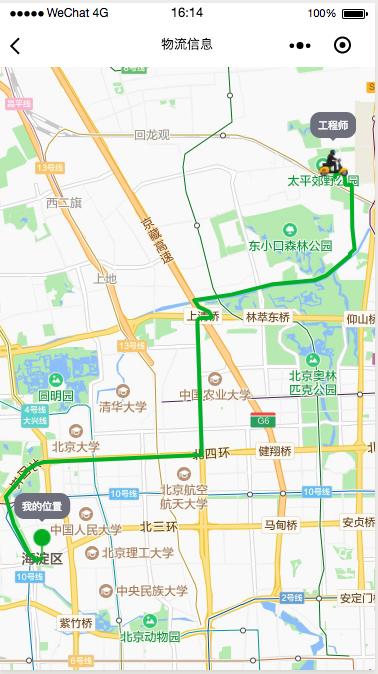
1、wxml文件
<view class="mapHeight">
  <map
    id="map"
    class="map"
    polyline="{{polyline}}"
    markers="{{markers}}"
    include-points="{{markers}}"
   ></map>
</view>
2、 js文件
var coors;
Page({
  data: {
    polyline: [],
    markers: [],
  },
  onReady: function() {
    this.mapContext = wx.createMapContext("map", this);
  },
  onLoad: function(options) {
    // 获取当前地图,设置经纬度,传递过来的坐标,用户下单的坐标地址。
    console.log(options);
    wx.getLocation({
      success: (res) => {
        this.setData({
          latitude: options.latitude,
          longitude: options.longitude
        });
        this.getCenterLocation(res);
        wx.request({
          url: 'https://apis.map.qq.com/ws/direction/v1/driving/?from=' + this.data.markers[0].latitude + ',' + this.data.markers[0].longitude + '&to=' + this.data.markers[1].latitude + ',' + this.data.markers[1].longitude + '&output=json&callback=cb&key=PD5BZ-K2VRO-CPEWZ-SOBAC-4KCDT-KAFLF',
          success: (res) => {
            coors = res.data.result.routes[0].polyline
            for (var i = 2; i < coors.length; i++) {
              coors[i] = coors[i - 2] + coors[i] / 1000000
            }
            console.log(coors)
            //划线
            var b = [];
            for (var i = 0; i < coors.length; i = i + 2) {
              b[i / 2] = {
                latitude: coors[i],
                longitude: coors[i + 1]
              };
              console.log(b[i / 2])
            }
            this.setData({
              polyline: [{
                points: b,
                color: "#00ae20",
                width: 4,
                dottedLine: false
              }],
            })
          }
        })
      }
    });
  },
  //  两个坐标 一个下单地址,一个工程师接单地址,然后不停的更新工程师的坐标位置。
  getCenterLocation: function(res) {
    this.setData({
      markers: [{
          iconPath: "/resources/center.png",
          id: 0,
          latitude: res.latitude,
          longitude: res.longitude,
          width: 30,
          height: 30,
          alpha: 0.8,
          callout: {
            content: " 我的位置 ",
            color: "#ffffff",
            fontSize: 10,
            borderRadius: 10,
            bgColor: "#6e707c",
            padding: 5,
            display: "ALWAYS"
          }
        },
        {
          iconPath: "/resources/user.png",
          id: 1,
          latitude: res.latitude + 0.1,
          longitude: res.longitude + 0.1,
          width: 30,
          height: 30,
          alpha: 0.8,
          callout: {
            content: " 工程师 ",
            color: "#ffffff",
            fontSize: 10,
            borderRadius: 10,
            bgColor: "#6e707c",
            padding: 5,
            display: "ALWAYS"
          }
        }
      ],
    });
  },
});
3、wxss文件
.mapHeight {
  display: flex;
  flex-direction: column;
}
.map {
  flex: 1;
  height: 100vh;
  width: 100%;
}
小程序工具提供多类型商城/门店小程序制作,可视化编辑 1秒生成5步上线。通过拖拽、拼接模块布局小程序商城页面,所看即所得,只需要美工就能做出精美商城。更多小程序商店请查看:小程序商店
KESION 科汛软件
KESION 科汛软件是国内领先的在线教育软件及私域社交电商软件服务提供商,长期专注于为企业提供在线教育软件及社交电商SaaS平台解决方案。
公司核心产品云开店SaaS社交电商服务平台、在线教育SaaS服务平台、教育企业数字化SaaS云平台、企微营销助手、私有化独立部署品牌网校和在线教育咨询等。KESION 不断通过技术创新,提供产品和服务,助力企业向数字化转型,通过科技驱动商业革新,让商业变得更智慧!
小程序验证码倒计时是小程序倒计时功能很常见的一种,输入手机号等待验证码的倒计时,那么这种形式要怎么获取呢?...
微信小程序中如何打开另一个小程序 ,点击一个小程序跳转到对应的小程序,然后点击可以返回上一个小程序。以下为实现流程...

科汛专注于在线教育软件及私域社交电商SaaS平台解决方案,让商业经营更简单。
地址:厦门市观音山国际商务中心6号楼606号
电话:400-008-0263/0596-2218051
邮箱:partner@kesion.com





国家高新技术认定企业

ISO20000

ISO27001

OHSAS18001
 闽公网安备 35020302001540号 统一社会信用代码:91350206MA2XN2XQ4A
国家高新技术企业编号:GR201735100465 软件企业证书号:厦RQ-2017-0034
软件产品证书号:厦RC-2017-0005
认证联盟企业编号:928180109031687687593 国际权威认证:信息技术服务管理体系标准(ISO 20000) 信息安全管理体系国际认证(ISO/IEC 27001)
闽公网安备 35020302001540号 统一社会信用代码:91350206MA2XN2XQ4A
国家高新技术企业编号:GR201735100465 软件企业证书号:厦RQ-2017-0034
软件产品证书号:厦RC-2017-0005
认证联盟企业编号:928180109031687687593 国际权威认证:信息技术服务管理体系标准(ISO 20000) 信息安全管理体系国际认证(ISO/IEC 27001)



 科汛其他产品